
Home » Download

Get the BD89 Mobile App: Download for Android and iOS
Fast, safe BD89 app download for Android and iOS mobile users
If you want the BD89 app download, this guide gives clear steps for Android and iOS with lighter data use in mind. Expect faster cricket odds, quick bet placement, and smooth JILI game play, all optimized for on-the-go users.
You can install the BD89 mobile app via the BD89 official site for Android (APK) and create an app-like shortcut on iPhone through Safari. We cover permissions, storage, notifications, and tips to install BD89 app quickly without slowing your phone.
Why the BD89 mobile app saves data and makes betting easier on phones
The app focuses on speed, simple flows, and transparency. You’ll get fast access to cricket markets, JILI titles, and support—without heavy pages or distraction.
Faster than the mobile website, even on average connections
Pages load quickly and cache common assets so you spend less time waiting and less data per session. Live cricket lines refresh smoothly, keeping you close to the action.
Lower data use for everyday plans and hotspots
The app is tuned to minimize image weight and script calls. This helps when you’re on limited data or sharing a hotspot.
Cricket-first experience with quick slips and live scores
Popular cricket leagues and internationals appear first. Odds update fast, and the betslip stays visible for rapid confirms.
Quicker BD89 login with biometrics and secure device binding
Use fingerprint or Face ID for instant access. Device binding and optional PIN reduce account risks if your phone is misplaced.
Casino and JILI games optimized for one-handed play
JILI slots and arcade-style picks open in clean views with clear buttons. You can switch games without losing your place.
Responsive in-app support with clear ticket history
Chat replies are prompt and saved to your message center. You can review past answers and follow up easily when needed.
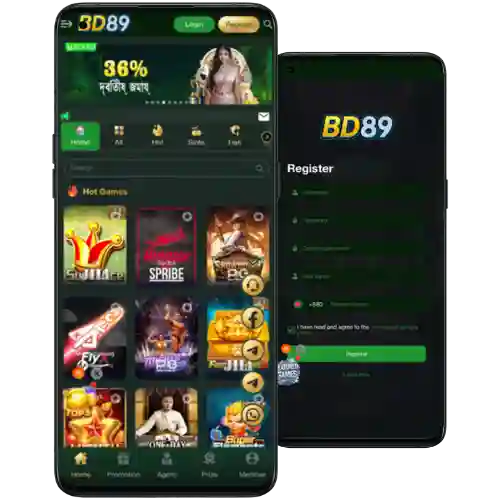
Step-by-step guide to download BD89 app and install it on Android
Follow these steps to download BD89 app safely and finish setup in minutes.
- Open the BD89 official site in your mobile browser and go to the app area.
- Tap the Android option to get the latest BD89 apk and confirm the file download.
- When prompted, allow your browser to install unknown apps (Settings > Apps > Special access > Install unknown apps).
- Open the downloaded file, review the publisher name, and tap Install. Wait for completion.
- Launch the app, allow notifications for cricket updates, and choose your preferred language.
- Sign in with your details or create a new account, then set up biometric login.
- Check for an in-app update prompt later to keep features current and stable.
Quick access buttons for Android APK and iOS home screen installation
BD89 Official Link — always use this source for the newest APK, update notes, and security checks.
BD89 App Download — Android users can tap to get the current APK and install in under a minute.
iOS: Open the site in Safari, tap Share, then Add to Home Screen. This gives you an app-like icon and fast access without extra storage.
Mobile-first features that keep cricket and casino play fast and simple
One-tap access with secure BD89 login options
Save time with fingerprint or Face ID. The app can remember your device while keeping withdrawals protected by extra checks.
Live cricket focus with faster market refresh
Cricket cards surface early with dynamic updates. Track price movements and settle small bets quickly during innings breaks.
Clean navigation with fewer taps to bet and play
Bottom tabs and clear icons reduce scrolling. You can jump from cricket to JILI slots and back without reloading heavy pages.
Smart notifications that respect quiet hours
Opt in for score swings, odds changes, and limited-time offers. Mute or schedule alerts to fit your day.
Local payments ready when you need them
The cashier supports trusted local payment choices. You can top up or cash out with familiar wallet methods like bKash or Nagad after basic verification.
Exclusive in-app offers, reload deals, and alerts tailored to frequent players
The app can notify you about cricket price boosts, reload deals, and time-limited free spins on JILI titles. Turn on notifications to hear about new campaigns early.
Some promos are app-first or time-sensitive. Check the promo page in the app to see wagering rules, valid games, and expiry times before you opt in.
BD89 bonus — view the latest app-friendly offers and read simple terms so you know exactly how to qualify and withdraw.

Safe installation habits, permissions to review, and staying updated the right way
Install the app carefully and keep it current. A few small checks help protect your account, device, and winnings.
Use the official source and verify file details
Download only from the official app page. Before installing, check the version number and file size to ensure they match the release notes.
Review permissions and limit what you don’t need
Allow install prompts when asked, but keep optional permissions (like location) off if they’re not required for your use.
Update through in-app prompts, not third-party mirrors
Accept updates inside the app so you receive the correct package. Avoid mirror sites that may host modified files.
Verify your account and match your payment name
Complete ID checks early and ensure the name on your account matches the name on your wallet or bank. This reduces withdrawal delays.
Contact support if anything looks unusual
If your phone flags the file or an update fails, open chat from the site. The team can confirm the latest build and guide a clean reinstall.
Frequently asked questions about downloading, installing, and updating the BD89 mobile app
Is the BD89 mobile app free to download and use?
Yes. The app is free to install. Data charges apply from your carrier, but there are no extra app fees from BD89.
How do I install the BD89 apk on Android safely?
Get the file from the official site, allow your browser to install unknown apps, then open the APK and tap Install. Launch, sign in, and enable biometric BD89 login for faster access.
Can iPhone users get the app experience on iOS?
If an App Store listing appears in your region, you can install it there. Otherwise, open the site in Safari and use Add to Home Screen for an app-like shortcut.
Why did my phone block the installation?
Android may block installs from unknown sources by default. Enable Install unknown apps for your browser, re-open the APK, and continue. If you see warnings, confirm you used the official source.
How do app updates work and will they use lots of data?
Updates are delivered in-app and aim to be lightweight. Connect to Wi‑Fi when possible, and install updates promptly for security and performance.
Ready to use BD89 on mobile? Download now and start playing smarter
Install the app to keep cricket odds, JILI games, and support one tap away. Start with Android APK or add a Home Screen shortcut on iOS, then place bets and manage your account on the go.
New to the platform? Create your account after install and set up fast login. BD89 Register to verify details early, enable trusted local payment choices, and claim eligible offers once you are ready to play.